 CS663
CS663Example — Mobile Video Coach (partial example)
Concept
Suppose a student team wants to create a Multimodal Mobile Video Coach that helps users improve how they give presentations.
The user records a presentation directly through the mobile application using the phone's camera and microphone. The application then analyzes the presentation using several computer vision, audio, and multimodal AI models.
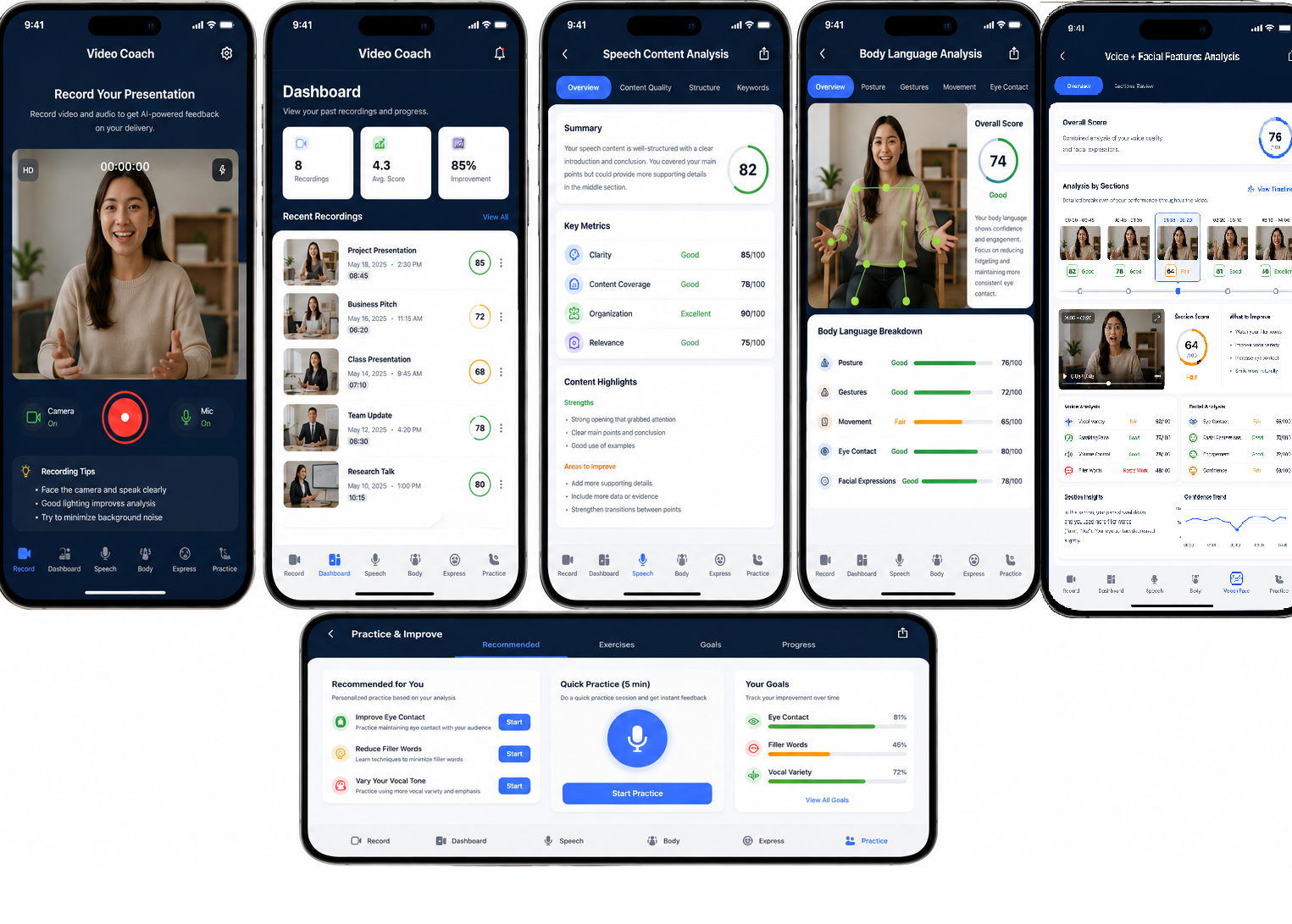
Instead of presenting one large generic AI report, the application organizes the results into several user-facing tabs, each representing a different analysis capability:
Record → Dashboard → Speech Content → Body Language → Voice + Facial Features → Practice
Each tab is powered by a different combination of models. This makes the application a true multi-model, multimodal system rather than a single model connected to several screens.
MODEL A — Student-Trained or Fine-Tuned Model Requirement --> Presentation Body-Language Behavior Model
The student must train or fine-tune this model
It might classify presentation behaviors such as:
- Effective gesture
- Limited gesturing
- Excessive movement
- Looking downward
- Audience-facing
- Good posture
- Slouching
Input: 2–5 second video clip
|
Some Possible Options:
|
MODEL B — Fine-Tuned Gemini Requirement --> Facial Analysis Model
NOTE: the idea here shows processing of individual frames but, doing video analysis may be more appropriate.
Purpose: Analyze individual sampled video frames and classify/describe the speaker's facial presentation behavior.
The video is divided into sections, and frames are sampled from each section:
Video
↓
Section 1: 0:00–0:45
Sample Frames 1, 2, 3, 4, 5
↓
Fine-Tuned Gemini — Model B
↓
Facial-analysis results
Then repeat for Section 2, Section 3, etc.
What would Model B detect?
I would avoid trying to infer internal emotions such as nervous, afraid, or confident. Those are difficult to establish reliably from facial appearance alone.
Instead, make the labels about observable presentation behaviors, such as:
- Neutral / expressive facial presentation
- Smile present / absent
- Facial expressiveness
- Audience-facing face orientation
- Looking downward / away
- Consistency of facial engagement
- Appropriate expression change
- Limited facial variation
For example, Model B might produce:
Frame 1
- Audience-facing: Yes
- Smile: Moderate
- Facial expressiveness: High
Frame 2
- Audience-facing: Yes
- Smile: Low
- Facial expressiveness: Moderate
Frame 3
- Audience-facing: No
- Looking downward: Yes
- Facial expressiveness: Low
Those frame-level outputs can then be aggregated for the video section.
Model C-- Voice Analysis Model
The recorded audio is analyzed using a normal pretrained Gemini model or another pretrained audio model
Its job is to analyze properties such as:
- Speaking pace
- Pauses
- Filler words
- Vocal variation
- Volume
- Emphasis
- Speech clarity
For example:
Section 01:35–02:20
Vocal Variety: 62/100
Speaking Pace: 76/100
Volume Control: 78/100
Filler Words: 48/100
>>> a Structured prompt is necessary to achieve this.
Model D-- Speech Content Analysis
The recorded video is transcribed using either Cloud Vision Services or an appropriate pre-trained model and this text is analyzed using a normal pretrained Gemini model or another pretrained model to give structured feedback on the content of the video speech.
Model E-- Practice Coach
The output from models A-D is input into an appropriate pre-trained model (e.g. Gemini) and this and is analyzed to give concrete practice experiences to the user to improve their speaking abilities such as:
- if excessive gesturing is detected, practice delivering a 30-second section while limiting gestures to one deliberate gesture per main point
- if speaking pace is too fast, practice the section with required pauses after each major idea.