Div tags + Common HTML layout tags
<div> tag
- Block-level Element
- Configure Specially formatted DIVISION or area of a web page
- Line before and after
- Can contain other block-lvel and inline elements line <p> and <span>
An example (with some CSS style applied to it) to create a "footer"
<div class=“footer">Copyright © 2009</div>
<span>
- configure area displayed IN-LINE wiht other elements...like within a paragraph
- NO line break before or after
- can apply your own styling to it.
Example
<span class="Hightlight_Grey"> This is important!!! </span>
This is important!!!!
We will talk about CSS in another lecture.
Other's to learn about
| Tag | Meaning / Purpose | Basic Example |
|---|---|---|
| <header> | Introductory content for a page or section; often contains logo, title, or navigation | <header><h1>Site Title</h1></header> |
| <nav> | Major navigation links for the site or a section | <nav><a href="/">Home</a></nav> |
| <main> | Primary, unique content of the page (one per page) | <main><article>Content</article></main> |
| <section> | Thematically related content with a heading | <section><h2>Features</h2></section> |
| <article> | Self-contained, reusable content (post, card, entry) | <article><h2>Post</h2></article> |
| <aside> | Tangential or supporting content (sidebar, callout) | <aside>Related links</aside> |
| <footer> | Footer content for a page or section (metadata, links) | <footer>© 2026</footer> |
| <figure> | Self-contained media with optional caption | <figure><img src="x.png"></figure> |
Where to learn MORE
Example --section
<section>
-
A thematic grouping of contentS
-
Usually has a heading
Tells browsers (and devices like screen readers) this is a distinct section/area of the webpage
Search engines use section + heading relationships to:
-
Understand page hierarchy
-
Extract meaningful content blocks
-
Improve relevance signals
-
-
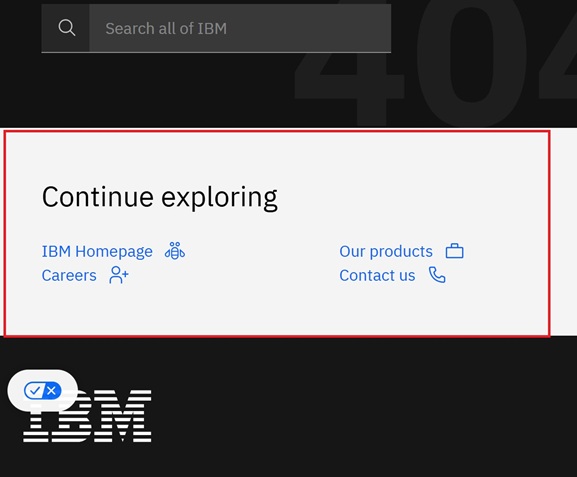
Here is example from IBM (ibm.com )
<section class="content-wrapper side cds-theme-zone-g10">
  <h3 style="margin-left: 1rem;">Continue exploring</h3>

  <div class="cds-css-grid" style="padding: 1.5rem 0 0;">

    <div class="cds--css-grid-column cds--sm:col-span-4">
      <c4d-content-item>
        <c4d-link-with-icon
          href="https://www.ibm.com/"
          data-autoid="c4d-link-with-icon"
          cta-type="icon-placement-right">

          <svg slot="icon"
               aria-hidden="true"
               width="20"
               height="20"
               viewBox="0 0 32 32">
          </svg>

          IBM Homepage
        </c4d-link-with-icon>
      </c4d-content-item>
    </div>

    <div class="cds--css-grid-column cds--sm:col-span-4">
      <c4d-content-item>
        Our products
      </c4d-content-item>
    </div>

    <div class="cds--css-grid-column cds--sm:col-span-4">
      <c4d-content-item>
        Careers
      </c4d-content-item>
    </div>

    <div class="cds--css-grid-column cds--sm:col-span-4">
      <c4d-content-item>
        Contact us
      </c4d-content-item>
    </div>

  </div>
</section>