Image Transormations
Geometric transformations
- Geometric transforms permit the elimination of geometric distortion
that occurs when an image is captured. Geometric transforms can
also be used to preform a desired geometric
distortion.
- Example: The attempt to match remotely sensed images of the same
area taken after one year, when the more recent image was probably not
taken from precisely the same position.To inspect changes over the year, it is necessary first to execute
a geometric transformation, and then subtract one image from the other.
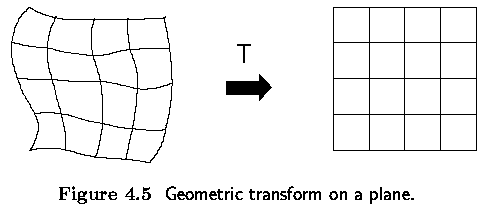
- A geometric transform is a vector function T that maps the pixel (x,y)
to a new position (x',y').

- The transformation equations are either known in advance or can be
determined from known original and transformed images.
- Several pixels in both images with known correspondence are used to
derive the unknown transformation.
A geometric transform consists of:
- Determine the Pixel Co-ordinate Transformation
- mapping of the co-ordinates of the input image pixel to the point in
the output image.
- the output point co-ordinates should be computed as continuous values
(real numbers) as the position does not necessarily match the digital grid
after the transform.
- Find the point in the image which matches the transformed
point and determine its brightness.
- brightness is typically computed as an interpolation of the brightnesses
of several points in the neighborhood.
Pixel co-ordinate transformations
- General case of finding the co-ordinates of a point in the output image
after a geometric transform.
- usually approximated by a polynomial equation

- This transform is linear with respect to the coefficients ark,
brk
- If pairs of corresponding points (x,y), (x',y') in both images are
known, it is possible to determine ark, brk by solving a set of linear
equations.
- More points than coefficients are usually used to get robustness.
- If the geometric transform does not change rapidly depending on position
in the image, low order approximating polynomials, m=2 or m=3, are used,
needing at least 6 or 10 pairs of corresponding points.
- The corresponding points should be distributed in the image in a way
that can express the geometric transformation - usually they are spread
uniformly.
- The higher the degree of the approximating polynomial, the more sensitive
to the distribution of the pairs of corresponding points the geometric
transform.
Bilinear Transformation
- In practice, the geometric transform is often approximated by the bilinear
transformation
- 4 pairs of corresponding points are sufficient to find transformation
coefficients

Affine Transformation
- Even simpler is the affine transformation for which three pairs
of corresponding points are sufficient to find the coefficients

- The affine transformation includes typical geometric transformations
such as
- rotation, translation, scaling and skewing.
- A geometric transform applied to the whole image may change the co-ordinate
system, and a Jacobean J provides information about how the co-ordinate
system changes

Note:
- If the transformation is singular (has no inverse) then J=0. If the
area of the image is invariant under the transformation then J=1.
- The Jacobean for the general bilinear transform (4.11)

- The Jacobean for the affine transformation (4.12)

Important geometric transformations
- Rotation - by the angle phi about the origin
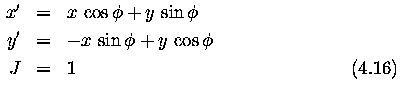
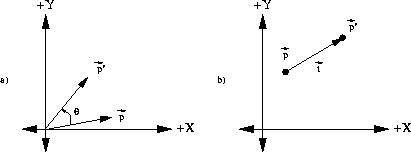
Figure: (a)Anticlockwise rotation of point p by
angle theta, (b) Translation of the point p by
the vector t
- Change of scale - a in the x axis and b in the y axis

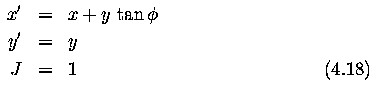
- Skewing by the angle phi
Complex geometric transformations (distortion)
- approximation by partitioning an image into smaller rectangular subimages;
- for each subimage, a simple geometric transformation, such as the affine,
is estimated using pairs of corresponding pixels.
- geometric transformation (distortion) is then performed separately
in each subimage.
- Typical geometric distortions which have to be overcome in remote sensing:
- distortion of the optical systems
- nonlinearities in row by row scanning
- nonconstant sampling period.
Brightness interpolation
- Assume that the planar transformation has been accomplished, and new
point co-ordinates (x',y') were obtained.
- The position of the point does not in general fit the discrete raster
of the output image.
- Values on the integer grid are needed.
- Each pixel value in the output image raster can be obtained by brightness
interpolation of some neighboring noninteger samples.
- The brightness interpolation problem is usually expressed in a dual
way (by determining the brightness of the original point in the input image
that corresponds to the point in the output image lying on the discrete
raster).
- Computing the brightness value of the pixel (x',y') in the output image
where x' and y' lie on the discrete raster

- In general the real co-ordinates after inverse transformation (dashed
lines in Figures) do not fit the input image discrete raster (solid lines),
and so brightness is not known.
- To get the brightness value of the point (x,y) the input image is resampled.

where
- f_{n}(x,y) ... result of interpolation
- h_{n} is the interpolation kernel
- Usually, a small neighborhood is used, outside which h_{n} is zero.
Nearest neighbor interpolation
- assigns to the point (x,y) the brightness value of the nearest point
g in the discrete raster

- The right side of Figure shows how the new brightness is assigned.
- Dashed lines show how the inverse planar transformation maps the raster
of the output image into the input image - full lines show the raster of
the input image.
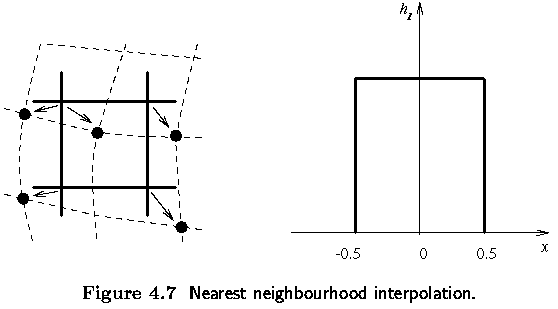
- The position error of the nearest neighborhood interpolation is at
most half a pixel.
- This error is perceptible on objects with straight line boundaries
that may appear step-like after the transformation.
Linear interpolation
- explores four points neighboring the point (x,y), and assumes that
the brightness function is linear in this neighborhood.

- Linear interpolation is given by the equation

- Linear interpolation can cause a small decrease in resolution and blurring
due to its averaging nature.
- The problem of step like straight boundaries with the nearest neighborhood
interpolation is reduced.
Bicubic interpolation
- improves the model of the brightness function by approximating it locally
by a bicubic polynomial surface; sixteen neighboring points are used for
interpolation.
- interpolation kernel (`Mexican hat') is given by

- Bicubic interpolation does not suffer from the step-like boundary problem
of nearest neighborhood interpolation, and copes with linear interpolation
blurring as well.
- Bicubic interpolation is often used in raster displays that enable
zooming with respect to an arbitrary point -- if the nearest neighborhood
method were used, areas of the same brightness would increase.
- Bicubic interpolation preserves fine details in the image very well.